Getting Started with Data
As a nonprofit, you may be required to collect and disseminate data for a variety of reasons. You may be required to report specific metrics to funders or you simply want to track your progress in achieving your organizational goals. Data is one of the most powerful tools a nonprofit organization can leverage to understand its impact, improve programs, and communicate value to stakeholders. Yet many organizations struggle with where to begin. This module will guide you through the fundamental concepts of working with data, from deciding what to collect to choosing the right tools for storage and analysis.
Whether you’re tracking program participants, measuring outcomes, or analyzing donor patterns, the principles in this guide will help you build a solid data foundation for your organization.
What is Data and Why Does it Matter?
Data is simply information that you collect systematically. For nonprofits, this might include:
Number of people served
Demographics of program participants
Survey Responses about program satisfaction
Donation amounts and frequency
Volunteer hours
Program costs and outputs
Why data matters for nonprofits
Measure Impact: Understand whether your programs are achieving their intended outcomes
Improve Programs: Identify what’s working and what needs adjustment
Secure funding: Demonstrate results to current and potential funders
- Make informed decisions: Base strategic choices on evidence rather than assumptions
- Tell your story: Communicate your organization’s value with compelling evidence
What Data Should You Collect?
The most common mistake organizations make is collecting either too much data without a clear purpose or too little to effectively answer important questions. As data gatekeepers, they bear the responsibility of balancing the necessity of data collection with its potential invasiveness. Individuals have a right to privacy and the right to control what information they feel comfortable sharing. An overzealous approach to data collection can unnecessarily infringe upon personal privacy, while an overly cautious approach can waste time and resources by producing insufficient or unusable data.
Here’s how to decide what to collect:
Start with Your Questions
Before collecting any data, ask yourself:
- What do we need to know to improve our programs?
- What outcomes are we trying to achieve?
- What information do funders require?
- What decisions will this data help us make?
Example Questions:
- Are we reaching our target population?
- Are participants satisfied with our services?
- What percentage of participants complete our program?
- How has participant knowledge/behavior changed after our intervention?
- What is our cost per person served?
Logic Models
This is where logic models can become invaluable. Logic models are a visual way to show how a program is supposed to work and the relationships between resources, activities, and results. Importantly, it helps us identify the specific data needed to answer important questions.
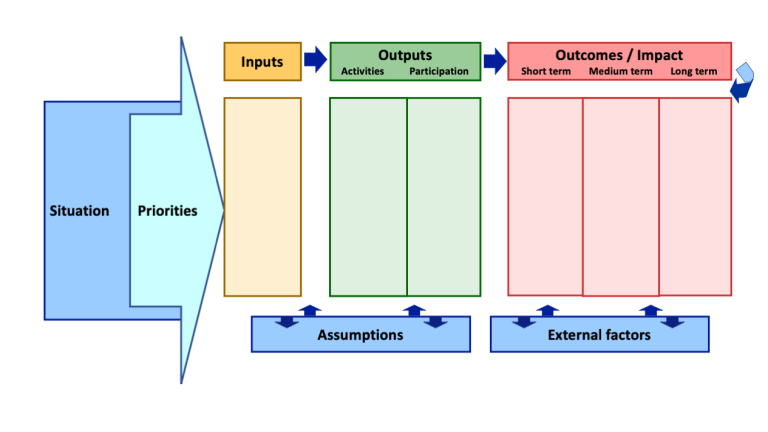
Below is a simplified table to help build your first logic model.
| Goal | Activities | Outcomes | Indicators |
|---|---|---|---|
| Your purpose | Your work | Achievements | How you know you found success |
Note, it’s important to distinguish outputs from outcomes. Outputs are the direct, tangible, and immediate results of your program activities. Outcomes are the changes or benefits that occur because of those outputs - they answer the “so what?” question.
For example, your efforts to establish new youth sporting leagues may have resulted in a total of 130 youth participating in sports. That’s an output - it’s what you directly produced. But the outcomes answer why that matters:
Output:
- 130 youth participated in the sports league
Outcomes:
Short-term: 85% of participants reported increased physical activity levels
Medium-term: 70% of participants demonstrated improved teamwork skills
Long-term: Participants showed reduced rates of childhood obesity compared to baseline
The output tells you what happened. The outcomes tell you what changed as a result.
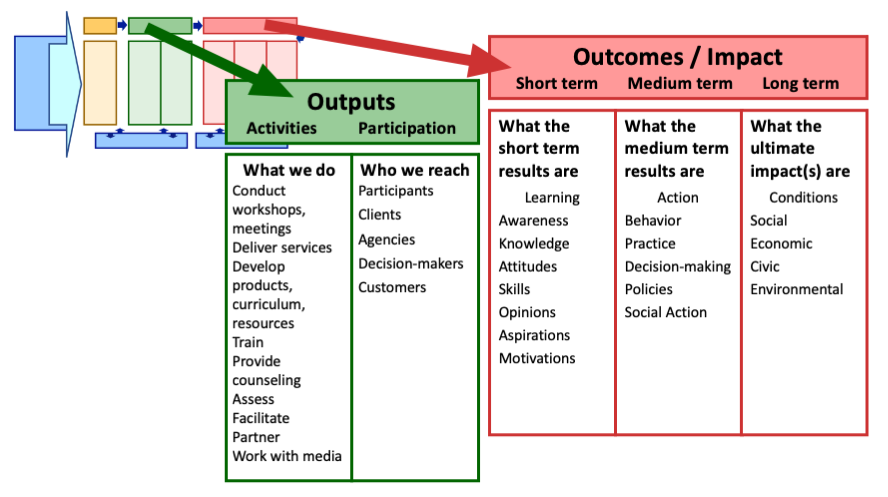
Consider what outcomes you ultimately want to see. This will be a great guide for you when determining what data you need to collect.
Essential Data Categories for Nonprofits
1. Participant/Beneficiary Data
Demographics (age, gender, location, income level, etc.)
Contact information
Enrollment and attendance records
Services received
2. Program Data
Activities conducted
Resources used
Staff time allocated
Costs per program
3. Outcome Data
Pre/post measurements (knowledge, skills, behaviors)
Completion rates
Satisfaction surveys
Long-term follow-up data
4. Operational Data
Volunteer hours
Staff capacity
Budget allocation
Partnership activities
5. Fundraising Data
Donor information
Gift amounts and dates
Campaign performance
Retention rates
The “Need to Know” vs “Nice to Know” Test
For each data point you’re considering collecting, ask:
Need to Know: Is this essential for measuring our impact or meeting reporting requirements?
Nice to Know: Is this interesting but not critical for decision-making?
Focus on need to know data first. You can always expand later.
Data Collection: Methods and Best Practices
Collection Methods
1. Surveys and Questionnaires
Best for: Gathering feedback, measuring satisfaction, assessing knowledge change
Tools: Google Forms, SurveyMonkey, Typeform, Microsoft Forms (all have free versions)
Tips: Keep surveys short (5-10 minutes max), use clear language, test before launching
2. Intake Forms
Best for: Collecting participant demographics and baseline information
Tools: Google Forms, JotForm, Typeform
Tips: Only ask what you’ll actually use, ensure privacy protection
3. Attendance Tracking
Best for: Monitoring program participation
Tools: Sign-in sheets (paper or digital), QR codes, spreadsheets
Tips: Make it easy for participants and staff to record attendance
4. Observation and Assessment
Best for: Skills demonstration, behavior change
Tools: Standardized rubrics, checklists, rating scales
Tips: Train observers for consistency, use validated assessment tools when possible
5. Administrative Records
Best for: Financial data, service delivery logs
Tools: Accounting software (QuickBooks, Wave), CRM systems
Tips: Establish consistent recording procedures
Best Practices for Collection
Consistency is Key
Use the same methods and questions over time to track trends
Train all staff on data collection procedures
Create templates and standardized forms
Ensure Data Quality
Build in validation checks (e.g., dropdown menus instead of free text)
Review data regularly for errors or missing values
Designate someone responsible for data quality
Respect Privacy and Ethics
Obtain informed consent for data collection
Explain how data will be used
Protect personally identifiable information (PII)
Follow regulations like HIPAA (for health data) or FERPA (for educational data)
Make It Easy
Integrate data collection into existing workflows
Use mobile-friendly forms
Keep forms simple and user-friendly
Data Organization: Structuring Your Information
Once you’ve collected data, you need to organize it in a way that makes analysis possible. Poor organization is one of the biggest barriers to using data effectively.
The Basic Data Structure
Tidy Data Principles:
- Each variable (type of information) should be in its own column
- Each observation (individual record) should be in its own row
- Each value should be in its own cell
Example:
| ParticipantID | FirstName | LastName | Age | City | StartDate | EndDate |
|---|---|---|---|---|---|---|
| 0001 | John | Doe | 38 | New York | 2025-10-01 | 2025-11-15 |
| 0002 | Jane | Doe | 42 | New York | 2024-12-14 | 2025-07-21 |
| 0003 | Adam | Smith | 68 | Albany | 2022-04-08 | 2023-02-06 |
Common Organizational Mistakes
Multiple pieces of information in one cell
Bad: “Maria Garcia, 34, Hartford”
Good: Separate columns for FirstName, LastName, Age, City
Inconsistent formatting
Bad: Mixing “Yes/No”, “Y/N”, “1/0” for the same type of question
Good: Choose one format and stick with it
Merged cells or complex layouts
Bad: Creating “pretty” tables with merged headers
Good: Simple, flat structure with clear column headers
Colors or formatting as data
Bad: Using red text to indicate “needs follow-up”
Good: Create a separate column called “FollowUpNeeded” with Yes/No values
Creating a Data Dictionary
A data dictionary is a document that explains what each variable means. This is crucial for ensuring everyone understands the data the same way. An example of a data dictionary may look something like this:
| name | type | values | description | sensitive |
|---|---|---|---|---|
| ParticipantID | int | Unique identifier of program participant | N | |
| City | character(50) | Home town of participant | Y | |
| StartDate | date | Date participant entered the program | N | |
| Gender | char(1) | M=Male, F=Female, N=Non-Binary, O=Other | Participant gender | Y |
Data Storage: Tools and Solutions
Database Solutions
Salesforce Nonprofit Cloud
Full CRM system with donor management, program tracking, and reporting
Steeper learning curve but very powerful
CiviCRM (Free, open-source)
Built for nonprofits
Constituent management, event tracking, fundraising
LiveImpact
All in one platform (donor management, case tracking, volunteers, grants, events)
For non-technical staff
Data Security and Privacy
Protecting the data you collect is not just good practice–it’s often legally required.
Essential Security Practices
Access Control
- Limit who can view and edit data
- Use password protection
- Remove access when staff leave
Data Encryption
- Use secure, encrypted storage (cloud services like Google Drive and Dropbox provide this)
- Use HTTPS for any web-based forms
Regular Backups
- Back up data at least weekly
- Store backups in a separate location (cloud backup is ideal)
- Test that backups can be restored
De-identification When Possible
- For analysis and reporting, remove names and other identifying information
- Use participant IDs instead of names when possible
Data Retention Policies
- Decide how long you’ll keep different types of data
- Securely delete data when it’s no longer needed
- Document your policies in writing
Write Confidentiality Agreements
- Have anyone working in the organization who has access to sensitive data sign an agreement indicating they will preserve the privacy and security of the data
- If you hire consultants who will need access to your data, this is an important step
Compliance Considerations
- HIPAA: If you handle health information
- FERPA: If you handle educational records
- GDPR: If you serve individuals in the European Union
- State laws: Many states have specific data privacy requirements
Create a field in your system that identifies all fields that may fall under the above categories. Systems such as Salesforce allows you to specify the level of sensitivity for any field you create.
Always consult legal counsel if you’re unsure about compliance requirements.
Creating a Data Collection Plan
A data collection plan documents what data you’ll collect, how, when, and who’s responsible. This ensures consistency and accountability.
Example of Data Collection Plan
| What Data | Why (Purpose) | How (Method) | When | Who is Responsible | Where Stored |
|---|---|---|---|---|---|
| Participant Age | To track whether we’re reaching our target age group | Intake form | At enrollment | Intake team member | Salesforce/Copy of form saved to Dropbox |
Implementation Checklist
- Identify key questions you need to answer
- Determine what data is needed to answer those questions
- Choose collection methods and tools
- Create or customize forms and instruments
- Test data collection process with a small group
- Train staff on procedures
- Set up data storage system
- Establish data quality checks
- Create backup procedures
- Document everything in a data collection plan
- Schedule regular data reviews
Next Steps
Now that you understand the fundamentals of data collection, organization, and storage, you’re ready to:
Complete the self-assessment below to evaluate your organization’s current data practices
Create your first data collection plan using the template provided
Explore my other modules:
Understanding Your Data (analyzing and interpreting your data)
Telling Stories with Data (visualization and communication)
Measuring Program Impact (evaluation frameworks)
Self-Assessment: How Ready Is Your Organization?
Rate your organization on each statement (1 = Strongly Disagree, 5 = Strongly Agree):
1. We have clearly defined what data we need to collect and why
2. We use consistent methods for collecting data
3. Our data is organized in a structured, usable format
4. We have secure storage for our data
5. Staff are trained on data collection procedures
6. We regularly review and use our data for decision-making
7. We have policies protecting participant privacy
Additional Resources
Free Tools
Google Sheets
Google Forms
Survey Monkey (Limited Free Version)
Qualtrics (Limited Free Version)
Further Reading
Logic Model Course (University of Wisconsin)
Need Help? If you have questions or would like personalized guidance on implementing these practices in your organization, please contact me.